Yep Agent: The Making Of (how we built a coding agent for YepCode processes)
Yep Agent, the making of
Yep Agent is our newest “build it for me” experience inside YepCode: you describe what you want, and it generates real, runnable YepCode processes (JavaScript or Python) as you iterate together.
If you like the term vibe coding, this is the same idea applied to automation: Vibe Automation—but with the guardrails required for production.
The origin story: Rules that let coding agents get the most out of YepCode steroids
When coding agents started to get good, we did what every platform team does: we wrote the rules:
- Processes are JavaScript/Python scripts, but with input parameters defined via JSON Schema and consumed by the code.
- You can create and import modules to reuse logic across processes.
- You have a datastore for persistence or storage for files.
- You can use environment variables and secrets safely (and teams need those patterns to be consistent).
- Other platform conventions: logs, outputs, execution context, HTTP request/response patterns, and the things that make code operational.
Because this workflow is “just code”, it worked well from day one: users could pull their workspace with the YepCode CLI, iterate in their favorite IDE (for example Cursor or Claude), and push changes back when ready. In other words: strong results, minimal lock‑in.
What wasn’t great about the early experience
The “use your own agent” workflow had real friction:
- You had to work on your local machine.
- You had to install and configure the YepCode CLI, clone repos, run the agent, and push changes.
- The path from “I want this automation” to “it’s running in the cloud” was not straightforward for the average user—and even for power users it was slower than it needed to be.
So we made a product decision: the agent must live in the platform.
Prototype phase: we tried building the agent from scratch
Our first serious attempt was to assemble the agent using Mastra.ai, a framework that’s great at:
- Agentic workflows
- Sub-agents (specialized roles)
- Tooling via MCP
- Modular extensibility
The initial strategy was the classic one: a carefully designed workflow where each step is guided by very detailed prompts.
It got us moving fast—until it didn’t.
Why prompt-only orchestration hit a wall
Two issues appeared quickly:
- Prompt gravity: prompts became long, fragile, and hard to maintain. Every new edge case added more instructions; every new instruction increased the chance of conflicts.
- Repo exploration wasn’t “real”: the agent needed better ways to explore a customer codebase—partial searches, contextual queries, quick iteration loops—without us manually feeding it slices of files.
- One-shot code generation: we needed the agent to generate complete processes/modules (not fragments), and that didn’t work reliably with a prompt-only approach.
At that point, we reframed the problem:
We didn’t need “more prompt.” We needed a coding environment the agent could actually operate in.
The turning point: integrating OpenCode (running in sandboxes)
We landed on a system like OpenCode because it gives you what a serious coding agent needs:
- It can run as a CLI and as a server.
- It supports strong tooling: file search, edits, running scripts, and extension points (including MCP-style tools).
- It naturally enables modular, distributed workflows in JavaScript/Python instead of trying to squeeze everything into one mega-prompt.
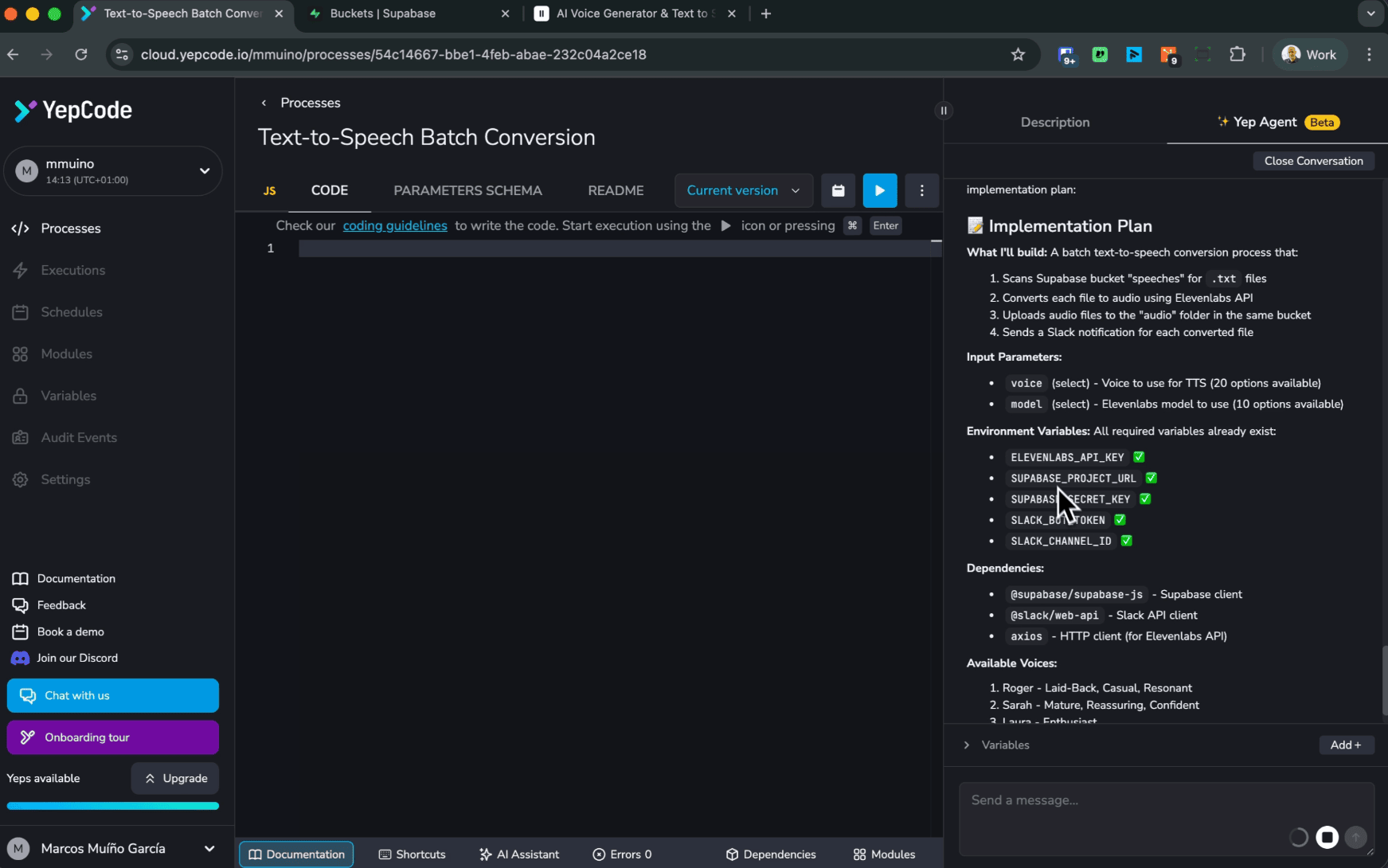
But integrating that into a multi-tenant platform comes with a non-negotiable requirement:
The agent must be safe by design
If an agent can run commands, read files, and modify code, it must operate in a sandbox that is:
- Isolated
- Ephemeral when needed
- Controllable and observable
We already had a battle-tested solution for that: microVM containers based on Firecracker, the same approach we use to execute YepCode processes securely.
So we did the obvious thing: run the agent runtime in the same security model as everything else.
How the agent integrates with the platform
Workspace sync (OpenCode ↔ YepCode) via YepCode CLI
OpenCode runs inside a sandboxed container, but the source of truth is still your remote YepCode workspace repository. To keep that loop tight and reliable, we use the YepCode CLI for synchronization:
- Clone/pull: when a sandbox starts (or when you resume work), the CLI pulls the latest state of your workspace into the container.
- Local edits: OpenCode applies changes directly on that working copy (processes, modules, schemas, docs—everything is just code).
- Push back: once the agent finishes (or you’re happy with the diff), the CLI pushes changes back to the remote YepCode workspace so they can be reviewed, evaluated, and executed in the cloud.
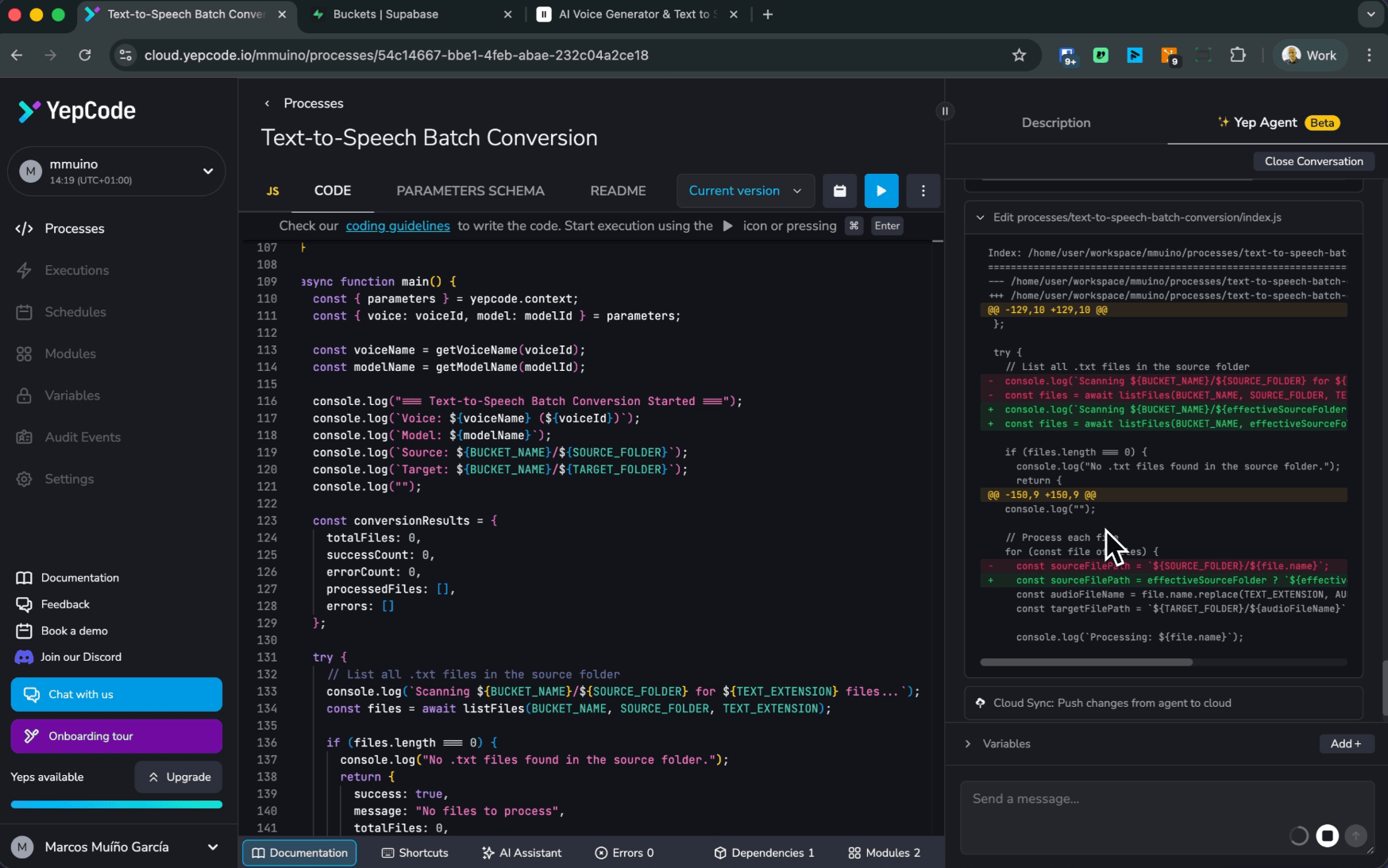
This keeps the agent workflow aligned with the same Git-based lifecycle teams already use, while avoiding any fragile “state mirroring” mechanisms.
MCP server integration
We also integrated our MCP server (built on the Model Context Protocol (MCP)) so OpenCode can call YepCode capabilities as tools—with explicit permissions scoped to the user workspace. This enables the agent to go beyond “editing files” and actually operate the platform, for example:
- Start executions of the processes it just generated (to validate behavior quickly).
- Create or update schedule configurations (cron jobs) so automations can run on a cron or time-based setup.
- Use the
run_codetool when it needs to execute small snippets safely as part of a workflow (e.g., validate assumptions, transform data, generate artifacts).
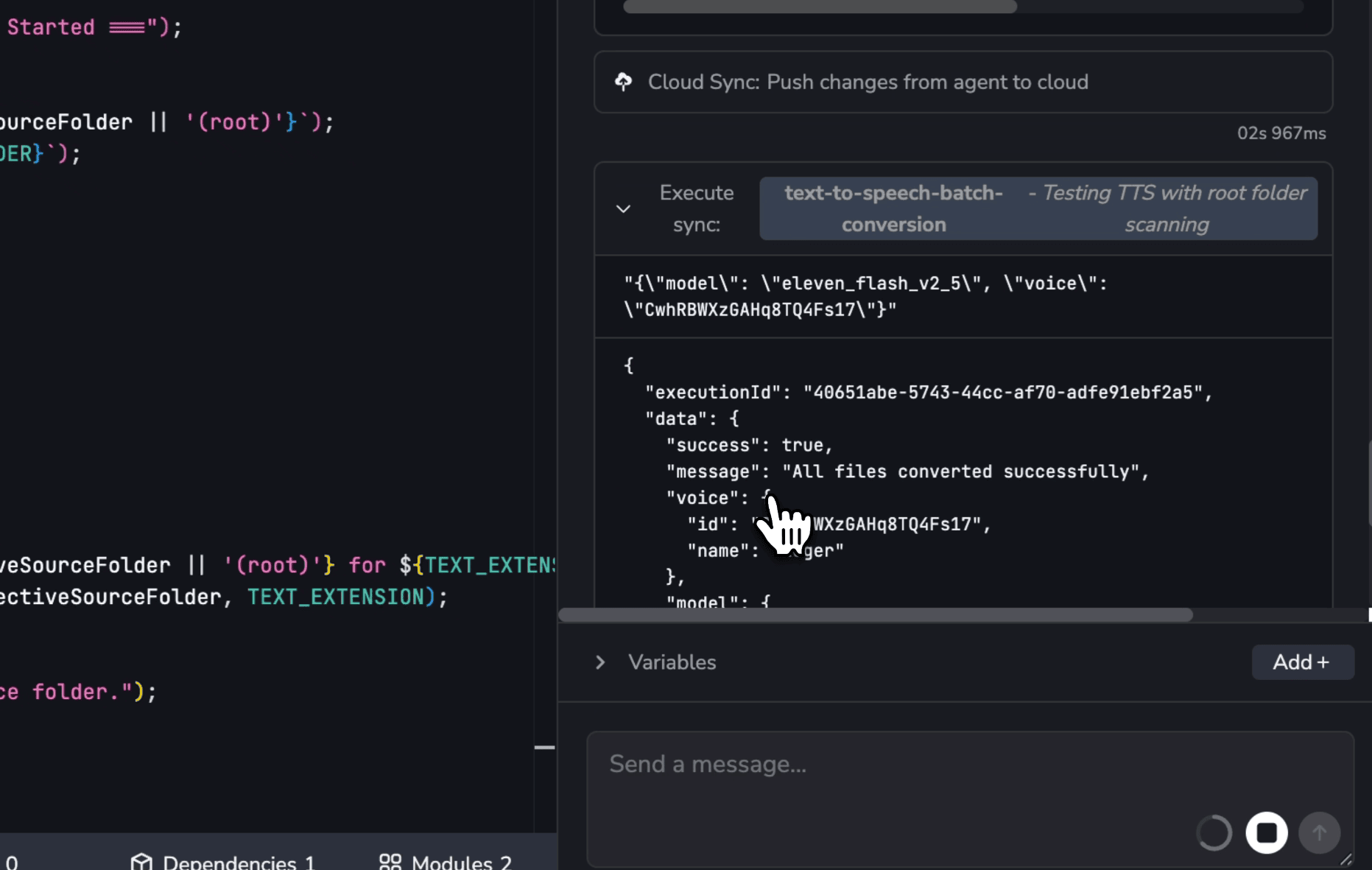
The result is a tighter loop: prompt → code → run → iterate—without leaving the platform, and without giving the agent uncontrolled access outside the workspace boundary.
The importance of run_code tool in this process
The run_code tool tool is a key piece of Yep Agent. It lets the agent execute small snippets safely as part of a workflow—and more importantly, lets it use your workspace secrets and environment variables without ever exposing their values to the LLM.
With that approach, the agent can validate assumptions against real services (databases, APIs, third-party tools) using credentials already configured in the workspace, and then use the returned information to keep improving the generated code.
How Yep Agent works (end-to-end)
At a high level, Yep Agent is a controlled bridge between:
- your prompts
- your codebase
- a secure execution/workflow environment
- and the YepCode primitives that make automations production-ready
Here’s the flow:
- Spin up an OpenCode instance If the user doesn’t have an active sandbox, we start one in an isolated container (microVM-based).
- Clone the customer workspace via YepCode CLI The agent works against a real repo checkout—no “paste your code here” workflows.
- Process the user prompt The instruction is forwarded to OpenCode, which plans and executes the work.
- Use sub-agents + tools OpenCode distributes tasks and calls internal tools (search, edits, scripts) and platform-provided tools (secrets access patterns, external integrations via MCP, etc.).
- Produce a real result Changes are applied locally and can then be pushed to the remote YepCode repository for review, evaluation, and execution in the cloud.
What we gained (and why it matters)
Better UX: no local setup required
The biggest win is boring—in the best way:
- no local agents to configure
- no licenses to manage
- no “clone this, install that, run this script, hope it works”
Just: prompt → generate → iterate → commit.
Better engineering: real repo semantics and real tooling
Once the agent can do true codebase work (search, contextual reads, incremental diffs), you unlock:
- faster iterations
- fewer hallucinations
- more consistent conventions
- easier adoption in existing repositories
Better governance: security + control plane alignment
By running the agent inside isolated containers and aligning it with YepCode’s execution model, we can treat agentic generation like any other operational workflow:
- controllable runtime
- clearer boundaries
- a safer story for teams that care about compliance and risk
Lessons learned (the honest part)
- Prompts are not architecture. They help, but they don’t replace tooling.
- Agents need real affordances: search, diffs, execution, iteration loops.
- Security can’t be bolted on. If an agent can run code, isolation must be foundational.
- “Generated code” only matters if it’s shippable: it must compile, run, handle inputs, and integrate with the platform primitives teams rely on.
What’s next
Yep Agent is the start of a bigger direction: bringing “from idea to production automation” into a single loop inside YepCode.
Some areas we’re excited about (and actively exploring):
- smarter templates and scaffolds for common automation patterns
- better multi-step workflows (plan → implement → validate → iterate)
- deeper integrations via MCP-style tools
- even more visibility into what the agent did and why
Try it, break it, tell us what you think
We’d love your feedback—especially from teams using YepCode to ship real automations under real constraints.
- Curious about building a similar agent for your team or product? We can help—reach out to us and tell us what you want to automate.