API Credentials
API credentials let you securely authenticate when integrating with YepCode.
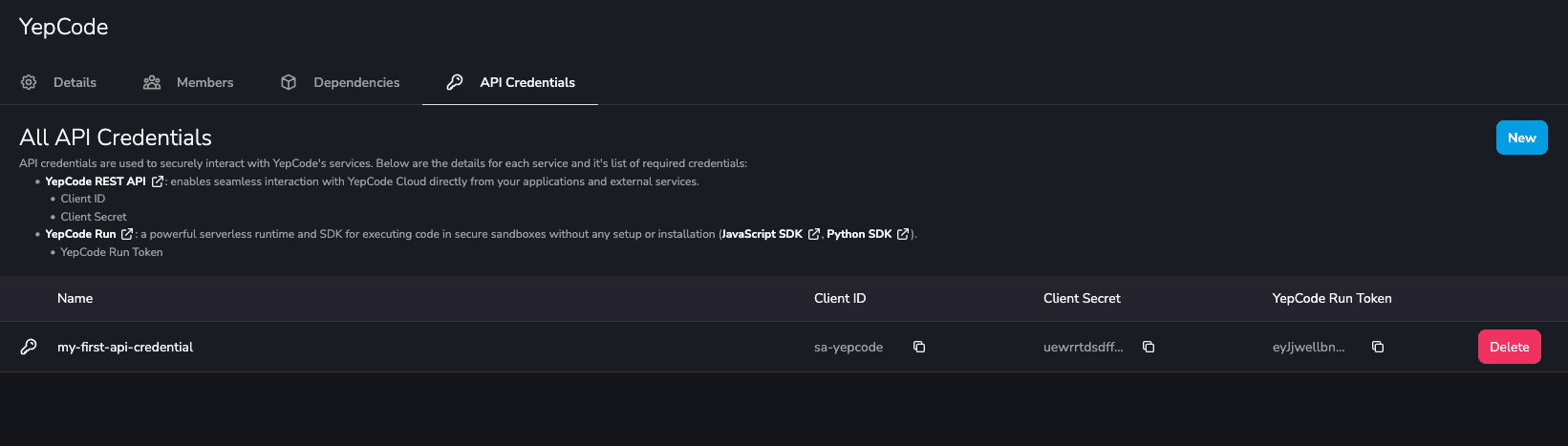
Each API Credential you create generates:
- An OAuth 2.0 Client Credential (Client ID + Client Secret) to call the YepCode REST API.
- A YepCode Run API Token to authenticate requests to the YepCode Run API.
- MCP Server endpoints (OAuth and No-OAuth) derived from the same credential.
Use these values in your integrations and rotate/delete the credential if you need to revoke access.
Available Services
Section titled “Available Services”Uses the Client ID and Client Secret (OAuth 2.0 Client Credentials).
Uses the YepCode Run API Token.
MCP Server
Section titled “MCP Server”Provides OAuth and No-OAuth endpoints linked to the same credential.
Create a new API Credential
Section titled “Create a new API Credential”Creating an API Credential automatically generates:
- An OAuth 2.0 Client Credential (Client ID + Client Secret) for the YepCode REST API.
- A YepCode Run API Token for authenticating against the Run API.
- MCP endpoints (OAuth and No-OAuth) derived from those credentials.
- Go to the API Credentials tab on the Settings page.
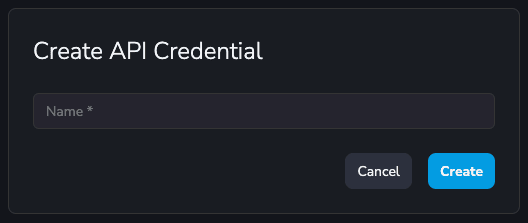
- Click any New button (both buttons trigger the same creation flow).
- Enter a name for the credential.
- Click Create.
After creation, the page will display:
- Client ID
- Client Secret
- Run API Token
- MCP endpoints (OAuth and No-OAuth variants)
Delete API Credential
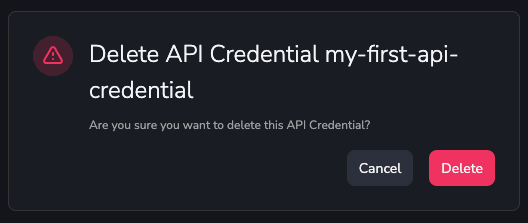
Section titled “Delete API Credential”- Go to the API Credentials tab on the settings page.
- Click on the “Delete” button.
- Confirm the deletion.